A feature I like in IE7 and use all the time is the Save as Tab Group function.
If you have a bunch of sites open and want to save them for later review, simply Add the whole set of Tabs as a Group in your favourites.
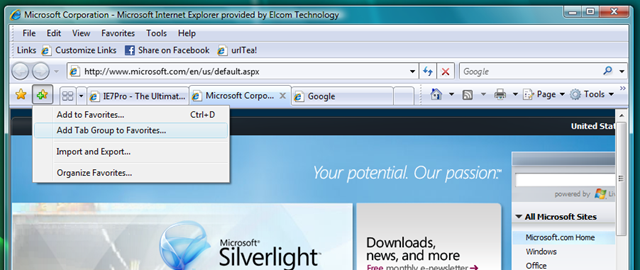
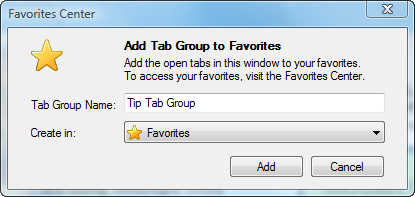
Later when you want to open the sites again, simply go to Favourites, choose the Tab group, right click and Open as a Tab Group
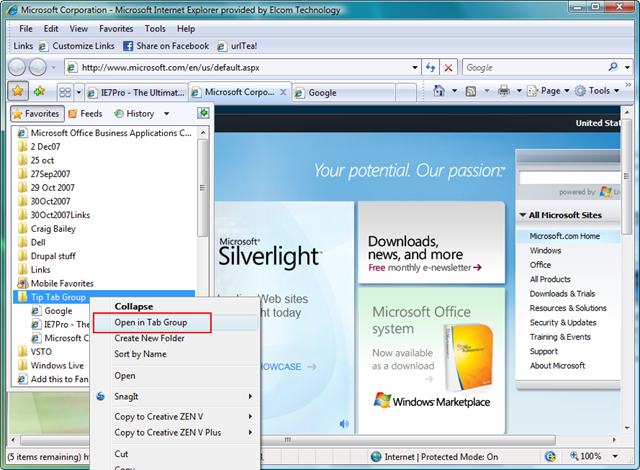
I usually save a whole bunch of open links to a Favourites Tab Group names with a date.

Love it – I also like the Ctrl+Enter and Ctrl+Shift+Enter shortcuts – see http://blogs.msdn.com/acoat/archive/2007/02/09/ie7-shortcut-add-a-custom-domain-to-a-website-address.aspx
Love it – I also like the Ctrl+Enter and Ctrl+Shift+Enter shortcuts – see http://blogs.msdn.com/acoat/archive/2007/02/09/ie7-shortcut-add-a-custom-domain-to-a-website-address.aspx